FiveM Loading Screen Creator
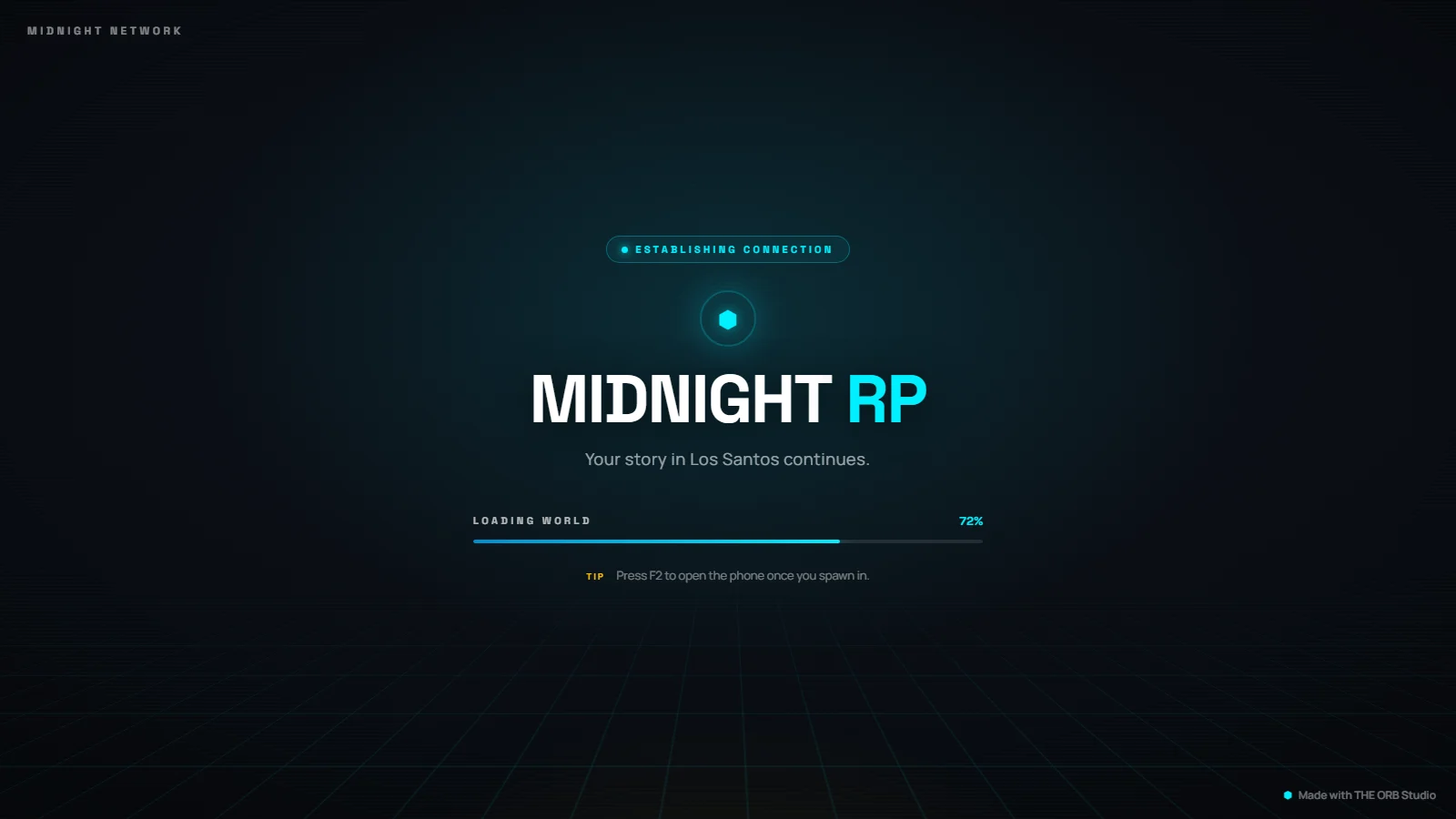
A FiveM loading screen is the page players see while connecting. This browser tool, free to try, builds one without code: pick a video or image background, add your logo, a progress bar, music and rotating tips, preview it full screen, then export a ready-to-drop FiveM resource.
Build a custom FiveM loading screen without writing a line of HTML or CSS. Add a video or image background, your logo, a progress bar, background music and rotating tips, preview it full screen, then export a resource you drop straight into your server. It runs entirely in your browser, and signing in with Discord gives you 10 free exports to start.
How it works
- 1
Pick a background
Start from a template or upload your own video or image. The preview updates live so you see exactly what players will see on connect.
- 2
Add your branding
Drop in your logo, set the server name, choose a progress bar style, add background music and write the tips that rotate while the server loads.
- 3
Preview it full screen
Open the full screen preview to check the timing, the music and how the layout reads on a real 1920x1080 screen before you ship it.
- 4
Export the resource
Download a ready to drop FiveM resource. Unzip it into your resources folder, add it to your server.cfg and restart. No build step, no code.
Features
Video and image backgrounds
Use an MP4 or a still image. Uploaded video is remuxed for fast start so it plays instantly in the FiveM CEF browser instead of showing a black screen.
Music with a volume control
Attach a track that plays during load, with a volume slider so it is not blasting at full level the first time someone connects.
Progress bar and rotating tips
Show real load progress and cycle through server rules, staff credits or lore while players wait.
One click export
Everything is packaged into a valid FiveM resource with its fxmanifest, so there is nothing left to wire up by hand.
Why use this instead of editing HTML and CSS by hand
The usual way to make a FiveM loading screen is to open someone else's template and edit the HTML, CSS and JavaScript directly. That means fighting with a video that will not autoplay, a progress bar that does not move, and a layout that breaks the moment you change the text. This tool gives you a visual editor with a live preview, handles the fiddly parts like video fast start and the fxmanifest, and exports a resource that works the first time.
- No HTML, CSS or JavaScript to touch
- Live preview instead of guess, save, reload, repeat
- Video is remuxed so it actually plays in game
- Valid fxmanifest generated for you
Frequently asked questions
Is the FiveM loading screen creator free?
Yes, to try it. Sign in with Discord, no card needed: you get 10 exports your first month and 5 every month after. On any paid plan, exports are unlimited.
Do I need to know how to code?
No. The whole point is that you never touch HTML or CSS. You configure the loading screen with a visual editor and export a finished resource.
Can I use a video background?
Yes. Upload an MP4 and it plays behind your loading screen. We remux the file for fast start so it begins playing immediately in the FiveM browser instead of showing a black frame.
Will the music play automatically?
Browsers mute autoplay by default, so the track starts muted and comes up under your control with a volume slider. This is a browser rule, not a limitation of the tool.
How do I install the loading screen in my server?
Download the exported .zip, unzip it into your resources folder, add the resource name to your server.cfg with ensure, and restart the server. It is a normal FiveM resource.
Does it work with ESX, QBCore and Qbox?
Yes. A loading screen is framework independent. It shows while the server loads, before any framework starts, so it works the same on ESX, QBCore, Qbox or a standalone server.
Is my content uploaded to your servers?
The editor runs in your browser. Your assets are packaged locally into the resource you download. We do not need to host your files to build the loading screen.
More free FiveM tools
GLB to FiveM Converter
Turn a GLB or glTF model into a FiveM prop online: a .ydr with textures and collision, packaged as a resource. Free to try, no install, no Blender.
OpenFiveM Script Optimizer
Find what makes your FiveM server lag. Scan your Lua and JS for busy loops, heavy events and slow queries, get a health score and the exact lines. Free.
OpenAll FiveM tools
See the full set of free tools in THE ORB Studio.
Built by THE ORB, for FiveM servers
Start free with your Discord login: 10 exports your first month and 5 every month after. Plans make exports unlimited and add credits for AI props and ORBIE's fixes.